stdio tunnels: Enabling Cloud Agents to reach local MCPs
By Eito Miyamura and Ilia Manolov
Overview
Want to connect your iMessage, Whatsapp, or LinkedIn DMs to your AI agent? An entire category of connectors is unavailable to apps like ChatGPT and Claude (on Mobile/Cloud) that are only reserved for local agents (e.g. Codex CLI, Claude Code CLI).
Today we at sealgate.ai would like to announce stdio tunnels, a new feature of our gateway that unlocks these local MCP connectors for use with any cloud AI agent!
Data + logins stay on your machine, and the code is available here: https://github.com/edison-watch/app (crates/stdiod), AGPL v3, Rust.
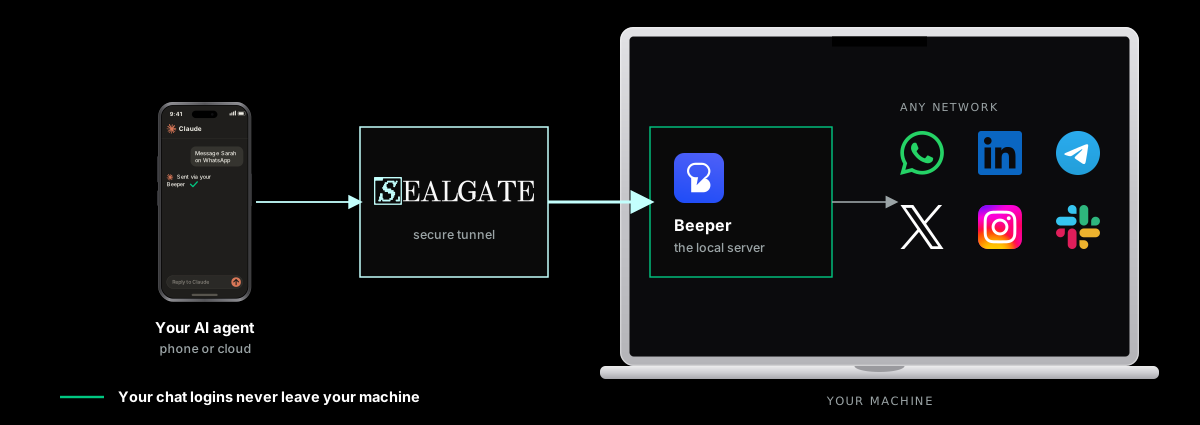
For the Beeper setup, try:
curl -fsSL https://raw.githubusercontent.com/Edison-Watch/app/main/crates/stdiod/scripts/install-beeper.sh | bash -s -- install --install-deps --yesPer-app setup and use cases: Connect your AI agent to WhatsApp, iMessage, Telegram, LinkedIn, or Signal. Beeper onboarding lives at https://sealgate.ai/beeper
MCP Was Born Local
Historically, MCP Servers (Model Context Protocols, aka AI Connectors) shipped local-first: client spawns server as subprocess, interface via stdin/stdout. Cloud agents (e.g. ChatGPT, Claude, Devin, any agents on mobile) cannot interface with stdio servers, limiting capabilities, especially for Cloud power users or non-technical users (who don't use CLI agents).
Local MCPs were effectively RCE (Remote Code Execution) on the device, which was perfect when the client + server was running on the same laptop: examples: Cursor, Claude Code CLI, or Codex CLI.
However, as the MCP standard developed, remote MCPs became the predominant way for existing applications to expose its interface to agents. This left local-first functionality only available to local agents/CLIs, which can still be useful to many users.
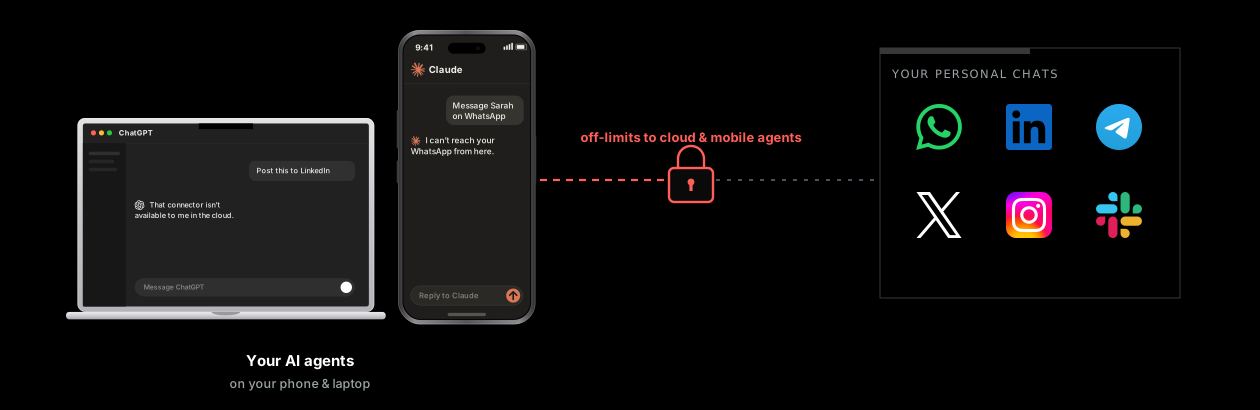
Motivation: Linking Agents to WhatsApp/Linkedin DMs/Telegram/iMessage/etc
The motivating factor for this implementation was that many members of our team were users of Beeper, a "unified inbox" for chat networks like WhatsApp, Telegram, iMessage, Slack, LinkedIn DMs, etc, and wanted to expose this to our agents. However, we quickly ran into the issue where the Beeper MCP server requires their desktop app running locally, and cannot connect via cloud, despite Beeper credentials managed on the cloud by design.
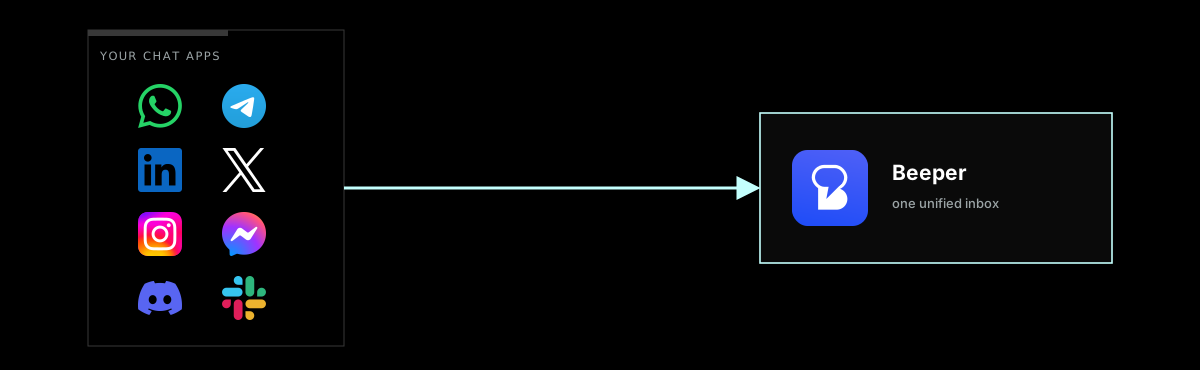
This meant that any cloud/mobile agents (like Claude.ai, ChatGPT, Devin) not running on our laptops/devices with Beeper desktop installed could not access the Beeper MCP. This significantly limited many of the automations we wanted to build with beeper MCP, some examples being:
- Syncing Linkedin DMs with CRM
- Lurking on Large Community Group Chats and looking for insights
- Automating repetitive messaging workflows
Stdio Tunnels: Connecting agents to your local devices
We solved this connectivity problem by creating stdiod - a tiny open-source daemon that lives on your personal machine. Set it up along with the Sealgate gateway in your favourite AI agent, and it'll allow you to run local workflows with ease.
On the technical side, stdiod authenticates and opens a WebSocket connection with the hosted SealGate gateway instance. This unlocks your device as a location to run your MCP server on the SealGate dashboard. stdiod will gracefully run any MCP server you throw at it, and translate the stdio instructions to http + sse ones your agent can understand, then forward those instructions to the gateway, somewhat similarly to tools like ngrok. stdiod is built to handle intermittent connectivity gracefully, be light on resource usage thanks to being built on Rust, and integrates well with the Sealgate gateway for full logging and error reporting. And it does all this without opening any special ports or requiring network configuration!
The final outcome is that with just a few clicks you can let your mobile agent (like the ChatGPT app) message people on LinkedIn, access files on your laptop, edit heavy Blender projects on your workstation, or perform any number of functions that can only work on your machine.
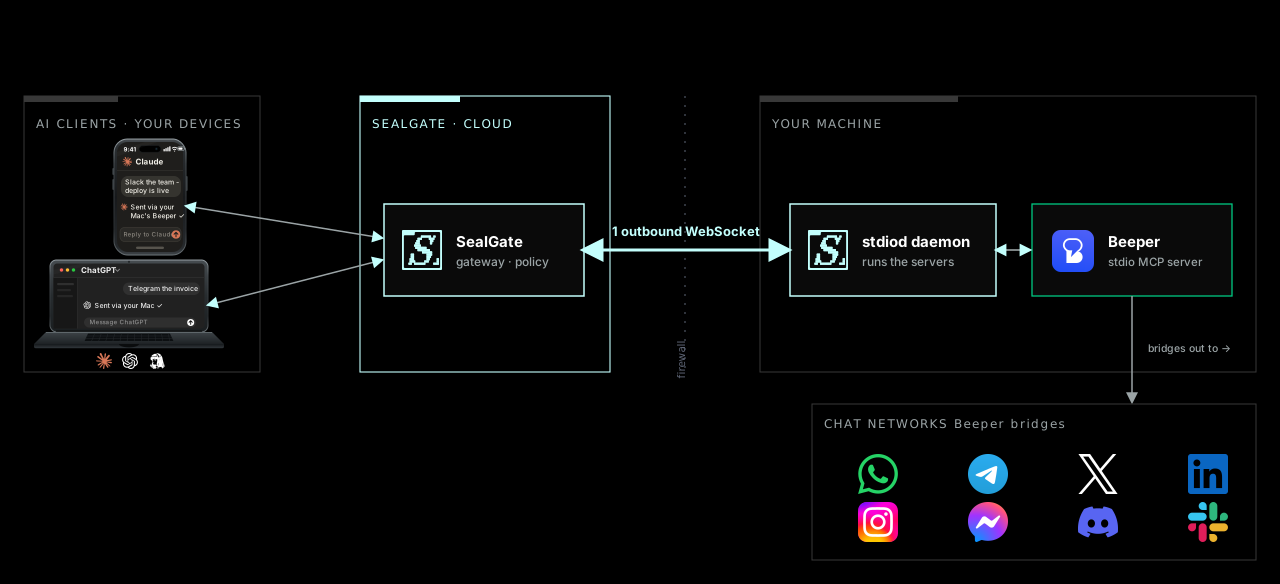
A few use cases we're excited about with stdio tunnels
stdio tunnels unlock a whole host of new functionality, and to give you a taste we will be posting about them in the coming weeks. Some examples include:
- Bridging embedded devices and agents (e.g. via BlueTooth): making the IoT dream come true over MCP
- Desktop control via cloud agents: just chat with your phone and have it figure out complex CAD or video editor menus (e.g. Blender, Adobe)
- Agents running on the cloud communicating/sending instructions with agents running on some local device B (e.g. Devin Cloud asks Codex CLI running on a Mac Mini to review some branch)
Limitations/Work Required
Stdio tunnels are still an early version of our vision of connecting agents to your devices.
- Currently experimental, no independent security audit
- Wire protocol + on-disk formats can change pre-1.0
- Supervised install implemented macOS + Linux (systemd) + Windows; maturity varies
- No sandboxing yet: child servers run on host at your privileges
- Docker / container isolation not an option yet
Takeaway
- MCP started local, many useful servers still local, agents moved to cloud
- SealGate stdio tunnels enable using local MCPs from your mobile/cloud agents through device daemons and local tunnels.
- You can try connecting your WhatsApp/Linkedin DM/iMessage/Telegram/etc to your agents with the following 1-liner command. (Recommended: Telling a CLI agent to help you set this up)
curl -fsSL https://raw.githubusercontent.com/Edison-Watch/app/main/crates/stdiod/scripts/install-beeper.sh | bash -s -- install --install-deps --yesReferences
stdioddaemon (source, protocol schema, architecture): https://github.com/Edison-Watch/app/tree/main/crates/stdiod- MCP transports spec: https://modelcontextprotocol.io/specification/2025-11-25/basic/transports
- CVE-2025-6514 (
mcp-remote) writeup: https://thehackernews.com/2025/07/critical-mcp-remote-vulnerability.html
Subscribe
New writing on securing agentic AI and MCP, straight to your inbox. No spam, unsubscribe anytime.